
This article covers several enhancements to the EFFI Mobile App, bringing the mobile experience closer to the functionality available in the web platform. These updates make it easier to manage leads, communicate with clients, collaborate with your team, and access key business information while on the go.
What's new: August–September mobile updates
| Area | What's New? |
|---|---|
| Documents | A new Documents screen with accept, reject, preview, download, share, and Sync to SharePoint |
| Voice to text | Dictate into any comment box, and use hold-to-talk in messages. |
| Accounts & Contacts | Create, link, and manage accounts and contacts from the app |
| Comment boxes | Rich text formatting in the edit screen and Enquiry section |
| Notifications | Tapping a notification opens the right task, lead or document screen. |
| Security | Biometric app lock |
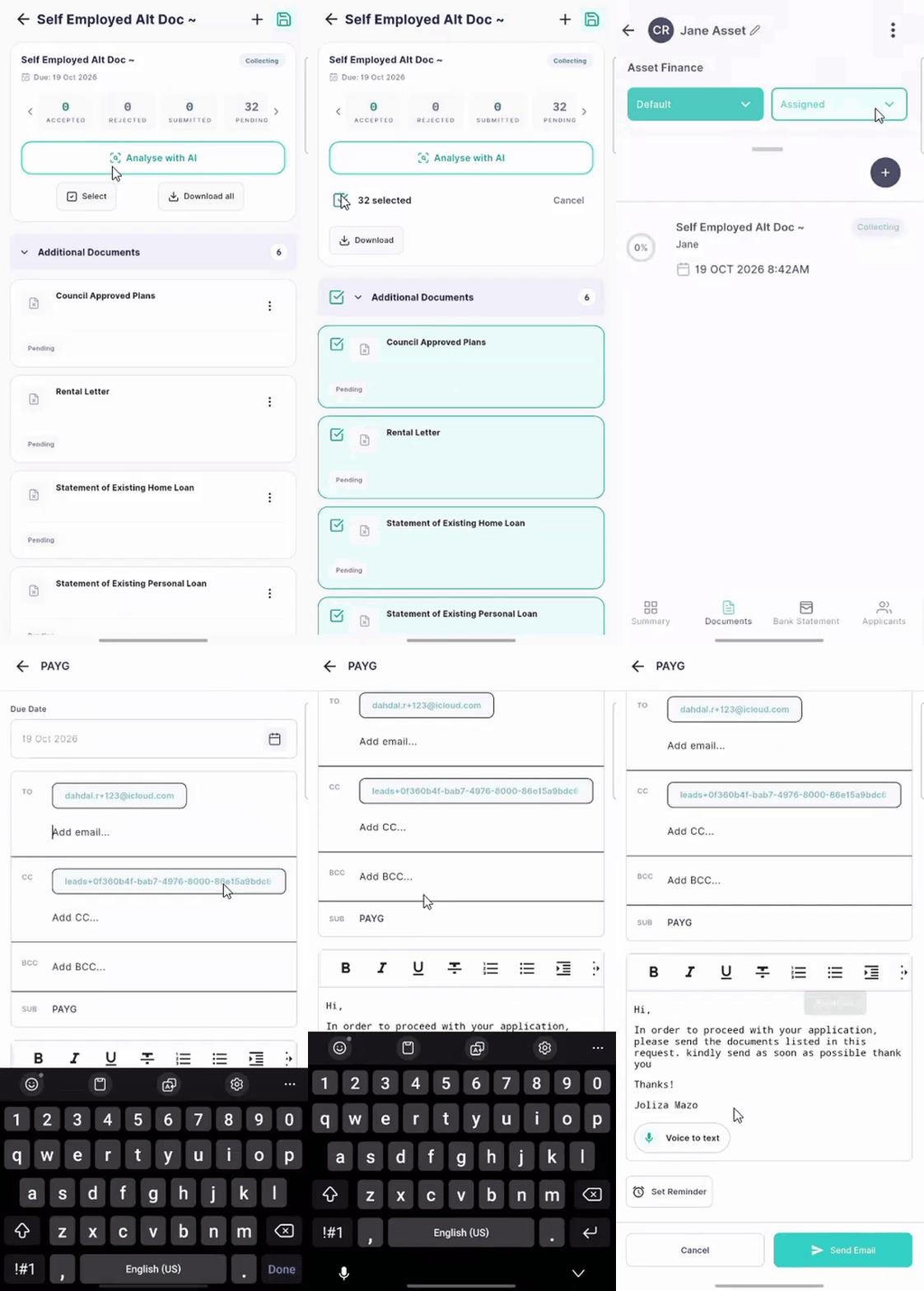 New Documents screen
Open a lead and tap the Documents tab to see all document requests for that client.
- Tap a request to see each document's status (accepted, rejected or pending) and the overall completion percentage.
- Tap a document to open its actions: Preview, Download, Re-upload, Accept, Reject and Activity log.
- If a document has more than one file, switch between the files at the top of the preview. Tap the preview to go full screen.
- Use Download to save the file to your phone or share it through another app.
- Select one or more documents and tap Sync to send them to SharePoint. Your Document Naming settings from the web app still apply.
- Upload extra documents from your phone, or edit a document's name and subheading.
AI analysis and fraud detection on mobile: where your business has AI detection turned on, each document shows its AI analysis and a colour-coded fraud detection shield. If it's off, the Analyse with AI button is disabled, and a message explains how to turn it on in the web app's Settings.
Voice to text
- Comment boxes: tap Voice to text under any comment box (notes, status changes, Add Lead, Enquiry). Speak, then tap the tick to keep the text or the cross to clear it. The text stays editable. While listening is on, the keyboard is paused, so stop listening before you type.
- Messages: press and hold the mic to dictate a message. Slide left to cancel, or swipe up to lock the mic so you can talk hands-free. You can pause, then accept or delete the text before sending.
Voice to text uses your phone's built-in iOS or Android speech recognition.
Accounts & Contacts
Accounts and Contacts are now in the app's navigation. You can:
- View the contacts linked to you and create new ones
- Create accounts, rename or delete them, and link contacts and leads to them
- Search existing contacts and leads, or create a new contact or account while adding a lead
- Change the primary applicant when a lead has more than one
- See the linked account from the lead's Applicant section
See Understanding Contacts and Accounts for how accounts and contacts work.
Notifications that open the right screen
Push and in-app notifications now take you straight to the relevant item. Task notifications open the Task Dashboard, lead notifications (for example, a lead assigned to you) open the lead, and document notifications (for example, a refreshed bank statement) open the Documents screen.
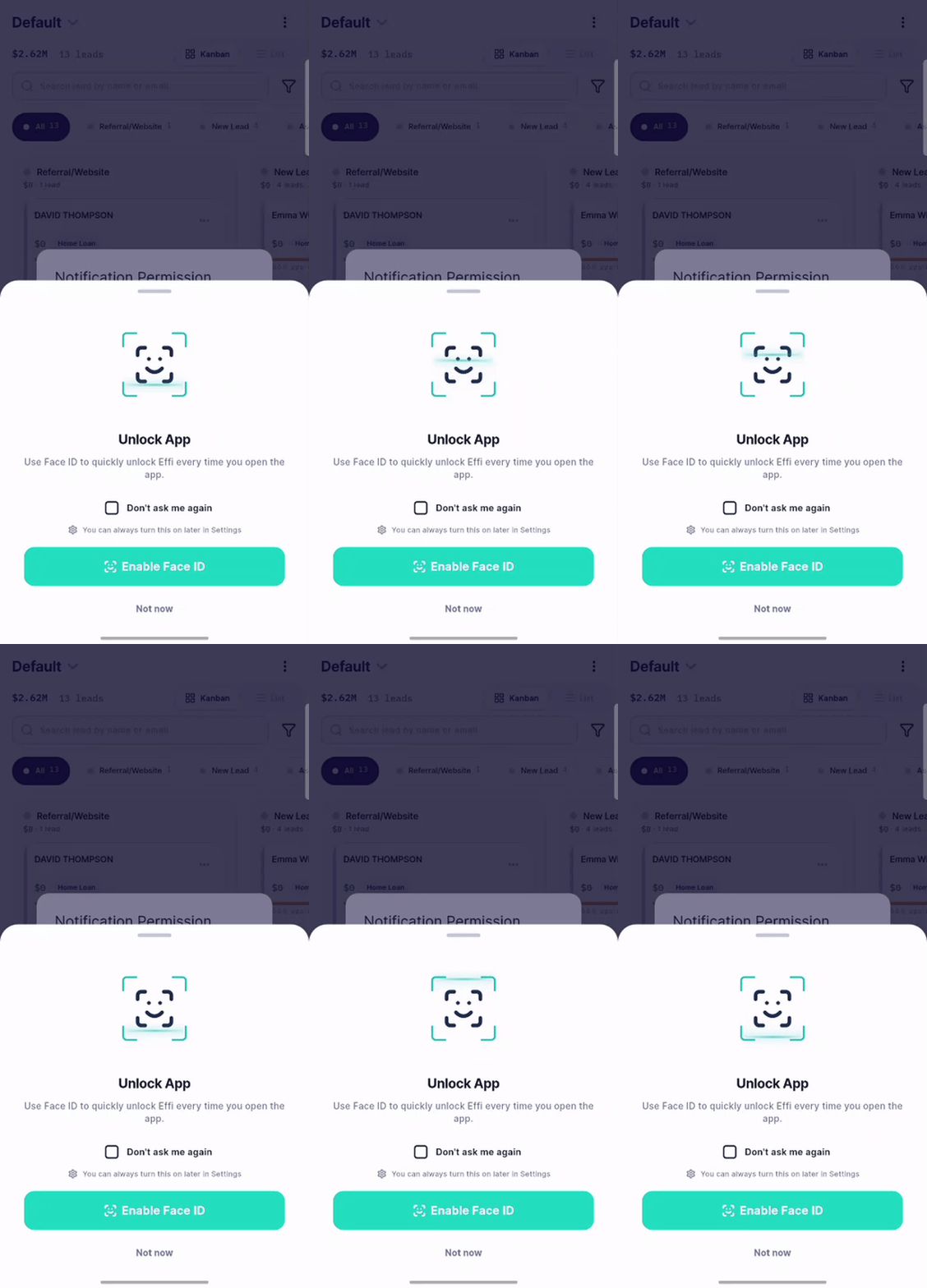 Biometric app lock:
You can now lock the app with Face ID or fingerprint.
KPI Dashboard (Phase 1)
The KPI Dashboard brings the Broker Portal dashboard experience to the mobile app, allowing brokers to monitor business performance anytime, anywhere.
Note: This is a Phase 1 (read-only) release. Dashboard customisation, target management, and editing capabilities will be introduced in future updates.
KPI Dashboard
View your key performance indicators, including:
- Leads
- Lodgements
- Approvals
- Settlements
- Active Pipeline
Performance is colour-coded to help you quickly identify whether you're on track against your targets.
Broker Performance
Monitor team performance through:
- Broker Scorecards
- Broker Breakdown
- Individual broker metrics
- Team performance summaries
Interactive Charts
Visualise business performance with interactive charts, including:
- Monthly lodgements
- Pipeline by stage
- Other KPI trends
Tap any chart to expand it and view additional details.
Needs Attention
Quickly identify leads requiring follow-up with dedicated At Risk and Waiting On lists.
Select a record to view more details and prioritise your next actions.
Real-Time Data
The mobile dashboard uses the same data as the Broker Portal, ensuring KPI results and performance targets remain consistent across both platforms.
Simply pull down on the dashboard to refresh and display the latest information.
Coming Soon
Future enhancements include:
- Edit Performance Targets from the mobile app
- Dashboard customisation
- Personalised widgets
- Saved dashboard layouts
- Search within the At Risk and Waiting On lists
June: Mobile App Updates
The latest Mobile App release introduces improvements across security, email and messaging functionality, lead management, reporting, referral partner management, user administration, and enterprise-specific configurations.
| Area | Summary |
|---|---|
| Security & Performance | General security enhancements, bug fixes, and performance improvements |
| Email & Messaging | Improved email synchronisation and enhanced email visibility within Messages |
| Lead Management | Enhanced management of assigned and co-assigned lead members |
| Azure Enterprise | Updates to Lead Enquiry and Loan Details fields |
Note: Some enhancements may be enterprise-specific and are only available where configured.
Security & Performance Improvements
The following improvements have been applied across the Mobile App:
- Security enhancements to improve application reliability
- Performance optimizations for a smoother user experience
- General bug fixes and stability improvements
Lead Management Enhancements
The Lead Details screen now provides improved visibility and management of assigned users.
Key Improvements
- View assigned and co-assigned members
- See the total number of assigned members
- Access member information directly from Lead Details
- Reassign lead ownership when required
Email Behaviour
When sending or receiving lead-related emails:
- Co-assigned members are automatically included in the CC field
- Lead IDs are included to assist with tracking and reference
Email & Messaging Enhancements
Improved Email Synchronisation
Email functionality has been enhanced to provide more reliable synchronisation and improved consistency across platforms.
Email Visibility Within Messages
Emails now appear directly within the Messages screen, allowing users to view:
- Subject line
- Email content
- Timestamp
- Signature information
Email messages are displayed using a structured format to improve readability, while standard messages continue to appear in chat view.
Attachment Support
Users can now view supported email attachments directly within the mobile app.
Supported file types include:
- Images
- PDF documents
Attachments can be previewed within the app and will download automatically if required.
Filters and Sorting in the Messaging Tab
You can now view all your emails, messages, notes, tasks, and calls in one place, making it easier to stay organised and track activity against a lead.
🔍 Using the Filter Dropdown
The Filter dropdown allows you to choose which activity types are displayed.
Available filters include:
- All – Displays Messages, Emails, Notes, Tasks, and Calls
- Messages – Shows only messages and SMS communications
- Emails – Displays emails sent from the app
- Notes – Shows notes added to the lead
- Tasks – Displays tasks only
You can select multiple filters at once. For example, you can view Notes and Tasks together or display only Messages. To update your view, simply select or deselect the relevant filter options.
↕️ Sorting Your View
You can now sort your list based on when each item was created or received:
Newest first (default) – See the most recent updates at the top
-
Oldest first – Review earlier updates first
🎥 Here's a quick feature walkthrough video!
💡 Tip
Filters and sorting work together—for example, you can view only emails sorted from oldest first to easily review your earliest correspondence.
Reports Available in Mobile App 📊
You can now access your Power BI reports directly from your phone, giving you insights on the go.
📱 Access your reports anytime, anywhere
💻 Enjoy the full functionality of reporting on your mobile device
Stay tuned for updates as we roll out more improvements!
Mobile Management Enhancements
Profile Icons and Quick Actions
Lead management has been enhanced to provide faster access to key actions and information.
Features
- View assigned broker, associate broker, and team members directly on the lead
- Quickly call, message, email, or add notes without opening the lead
- Access lead editing options via the three-dot menu
- Assign members and referral partners directly from the lead
- Send leads to your aggregator from within the app
- Edit enquiry and loan details
- Send documents and access forms directly from the lead page
Referral Partner Management
Referral Partner management has been expanded to improve visibility and administration.
Features
- Filter partners by user or status
- Edit and update active referral partners
- Mark referral partners as inactive
- Delete inactive referral partners
- Search partners by name or email address
User Management for Administrators
Administrators can now manage users directly within the Mobile App.
Features
- View all team members
- Filter users by role, status, and activation state
- Manage active and deactivated users
- Deactivate users prior to deletion
- Delete deactivated users instantly
- Search users by name, email address, or phone number
🎥 Here's a quick feature walkthrough video
What’s Next?
We’ll continue enhancing the app to make the mobile experience as powerful as the web platform.
Have Questions or Feedback?
Email us at support@effi.com.au—we’d love to hear from you.
Comments
0 comments
Please sign in to leave a comment.