Send, sign and track Credit Guides with EffiSign. Plus, the new Contacts tab in every Lead Opportunity. ͏ ͏ ͏ ͏ ͏ ͏ ͏ ͏ ͏ ͏
| November 2026 · Two new things |
Less chasing.
More connecting.
|
|
Send, sign and track Credit Guides with EffiSign, and keep every contact and conversation right inside the Lead Opportunity you’re working on.
|
01
EffiSign Credit Guides
|
|
02
Business contacts for your deal
|
|
|
|
|
Hi %FIRSTNAME%,
At Effi, simplicity is at the heart of everything we do. We know you have better things to do than chase signatures, juggle emails and switch between screens. This month brings two updates that keep more of your work in one place, right within Effi.
|
|
|
New · EffiSign
Your Credit Guide just got a whole lot simpler.
|
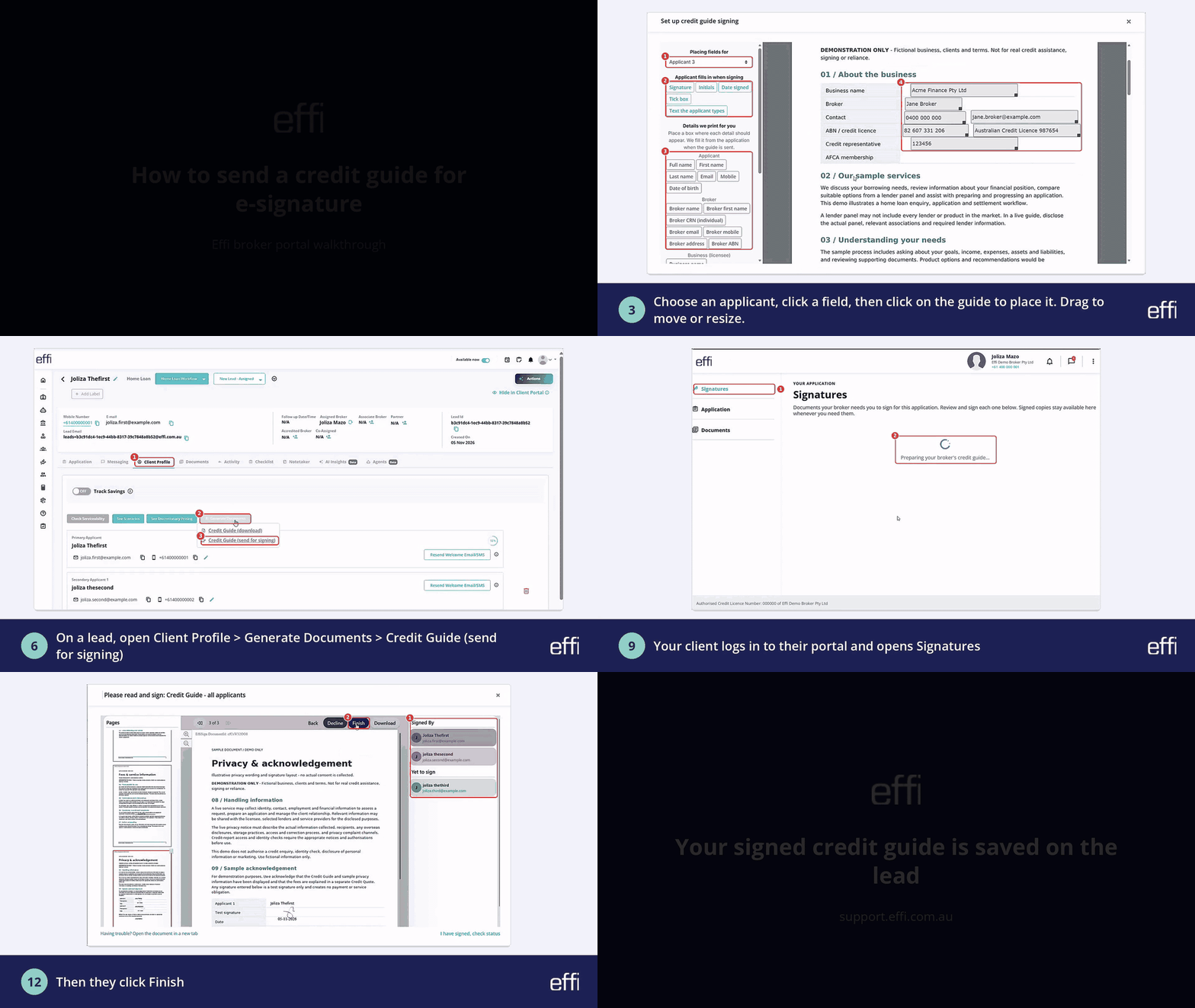
From preparing your Credit Guide to sending it for signature and tracking completion, everything happens in one place, right within Effi.
|
|
|
▶ Watch the full walkthrough
|
|
Here’s what makes it simple
|
Set it up once. Keep things moving.
Configure your Credit Guide at the broker or business level, keeping things consistent across your team.
|
|
|
Send it your way.
Automatically present Credit Guides through the Client Portal, or send them manually for signing when needed.
|
|
|
Multiple applicants? We’ve got you covered.
Each applicant can securely review and electronically sign their Credit Guide through their own Client Portal access.
|
|
|
Stay on top of every signature.
Track progress, check completion status and access signed documents without the endless back-and-forth.
|
|
|
|
Ready to simplify your Credit Guide process?
We’ve put together an easy step-by-step guide to help you set up, send and track your Credit Guides.
Set it up once. Send with ease. Let EffiSign do the heavy lifting.
|
|
|
|
Also new · Contacts tab
Your deal’s business contacts and conversations, all in one place.
|
The Contacts tab within a Lead Opportunity brings together the business contacts related to the deal, so you can view their details and stay in touch while working on the opportunity.
|
|
|
▶ Watch the full walkthrough
|
|
What’s new? Here’s the good stuff
|
Your business contacts, right where you need them. View the business contacts related to the deal directly within the Lead Opportunity. |
|
Keep the conversation going. Send emails to business contacts related to the deal directly from the Contacts tab. |
|
You decide what’s visible. Manage whether communications are visible to your contacts, so you control what you share. |
|
Keep everything connected. Review contact details and relevant communications in one spot, and pick up right where you left off. |
|
|
Ready to give it a go?
Open a Lead Opportunity in your Effi Broker Portal and select the Contacts tab. Want a little guidance? Our step-by-step guide walks you through it.
|
|
|
Keep your contacts close, your conversations connected and your workflow simple. If anything’s unclear, just hit reply and our team will help.
|
|
The Effi Team
Making the complex simple.
|
|
|
|
|
|
Need a hand? support@effi.com.au · Mon–Fri, 9am–5pm AEST
Help Centre · effi.com.au
|
|



Comments
0 comments
Please sign in to leave a comment.