|
effi.
|
RELEASE NOTES · OCT 2026
|
|
NEW
|
Template Management (Beta) is here |
|
Your Templates.
Your Way.
|
|
More flexibility. Less admin.
Better client communication.
Personalise your templates, simplify
your document workflow and explore
what’s new in Effi this October.
|
|
|
IN THIS ISSUE
|
|
UPDATES TO TRY
Five updates to explore this month
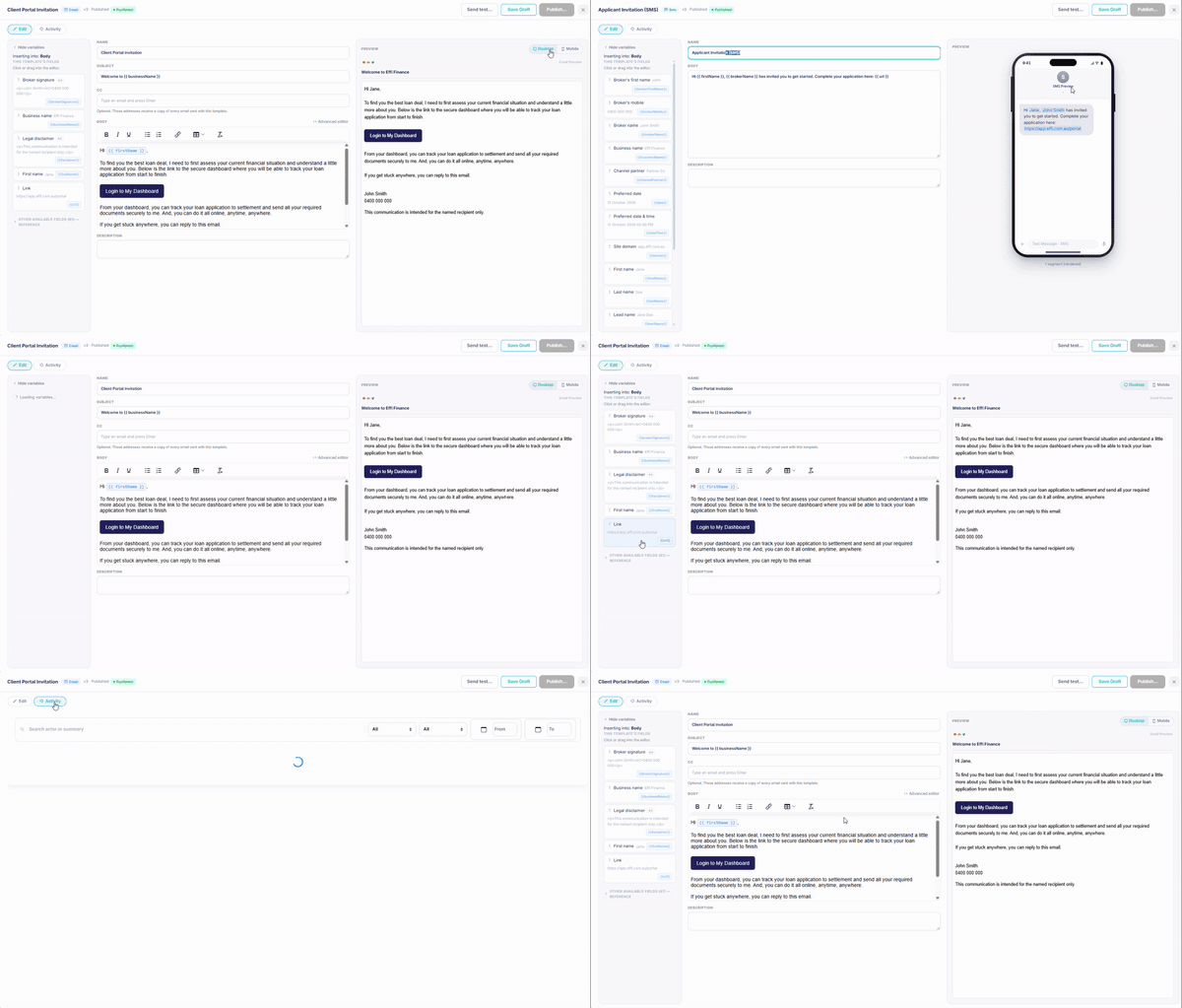
Your Templates. Your Way.
More flexibility. Less admin. Better client communication.
We're excited to introduce
Template Management (Beta),
giving you greater control
over how your business communicates
with clients.
From everyday emails to automated
updates, you can now personalise,
create and manage templates
directly in Effi.
What's New?
Make it yours — Customise System Templates
Personalise
standard
Effi
emails
and
SMS
messages
to
reflect
your
business
and
communication
style.
|
|
Create once, use anytime — Custom Templates
Build
your
own
reusable
email
and
SMS
templates
for
follow-ups,
appointments,
document
requests
and
more.
|
|
Keep it simple — Document Templates
Create
and
manage
document
request
checklists
to
make
collecting
client
information
easier.
|
|
Work smarter — Automated Messages
Set
up
messages
triggered
by
workflow
stage
changes,
helping
keep
clients
informed
at
the
right
time.
|
|
Stay in control — Preview & Track
Preview,
test
and
publish
templates,
with
an
Activity
Log
to
track
changes.
|
|
Why You'll Love It
Less repetitive work. More
consistent messaging. A smoother
experience for your team
and clients.
Ready to Explore?
Head to Settings → Templates
in Effi to get started.
Your business. Your message. Your way.
Template Management is in Beta. Some features require activation and appropriate permissions.
|
|
| 02 / DOCUMENT WORKSPACE |
NEW
|
Review a whole document pack in one place.
In a Document Collection
request, click Preview all
to see every file in one
workspace. Run AI analysis
on just the documents you
select.
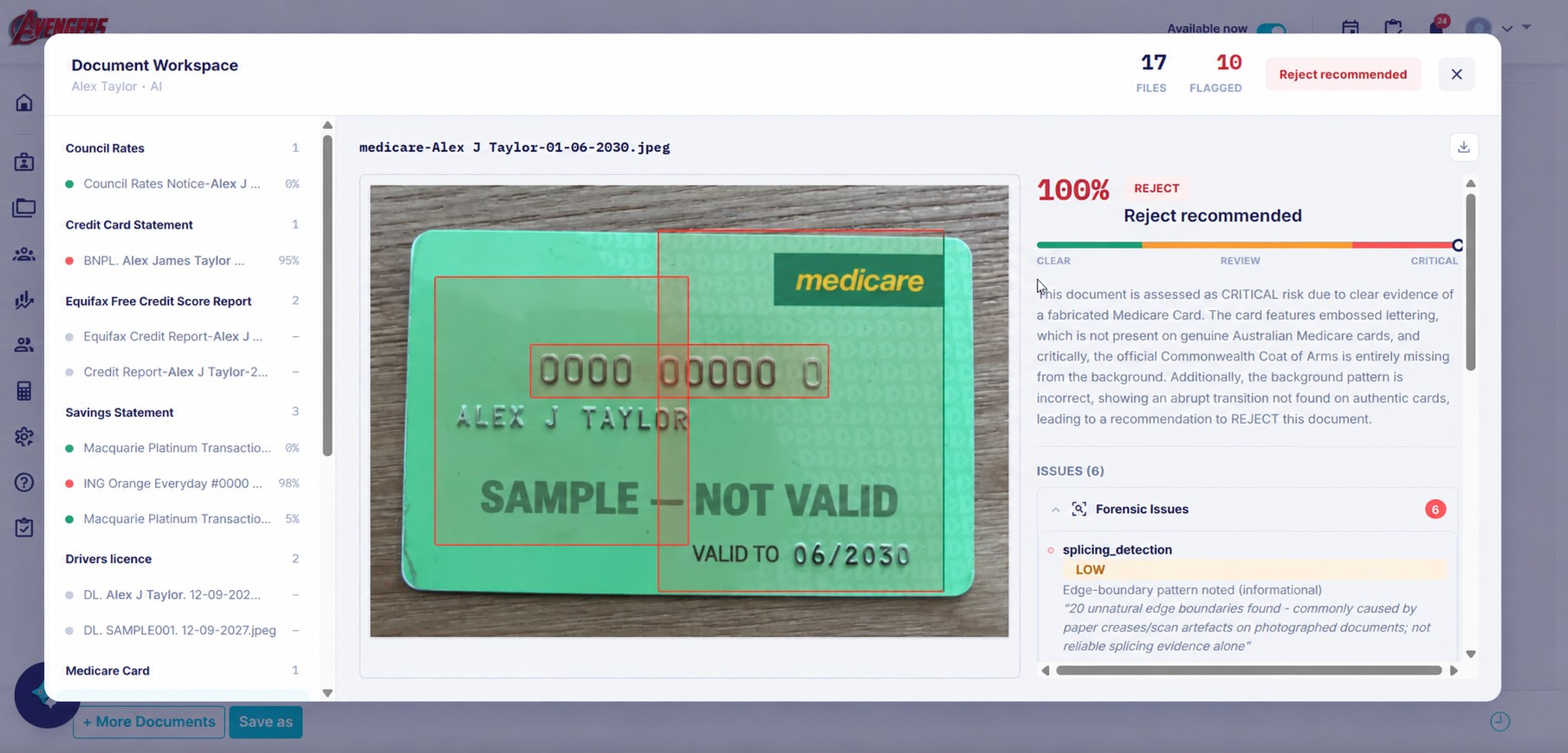
| BEFORE |
NOW |
| One document at a time, from a side panel |
Every document in one workspace |
| Analyse every document in a request |
Analyse only the ones you select |
|
|
|
03 / SMARTER FACT FINDS
Less retyping. Fewer duplicates.
With your client’s consent,
run Equifax from Personal Details.
Liabilities populate and
a report summary lands in
Broker Notes.
Smart Fill combines multiple
payslips into one employment
record, saved to the Document
Collection.
Equifax guide →Smart Fill guide →
|
|
04 / EFFI ON THE GO
Talk instead of type.
Dictate comments and messages,
review and sync documents,
and manage Accounts &
Contacts from your phone.
Voice dictationKPI dashboardBiometric loginDeep-link notifications
Explore mobile updates →
|
|
|
05 / MEETING NOTES, MADE EASIER
Keep the conversation. Skip the typing.
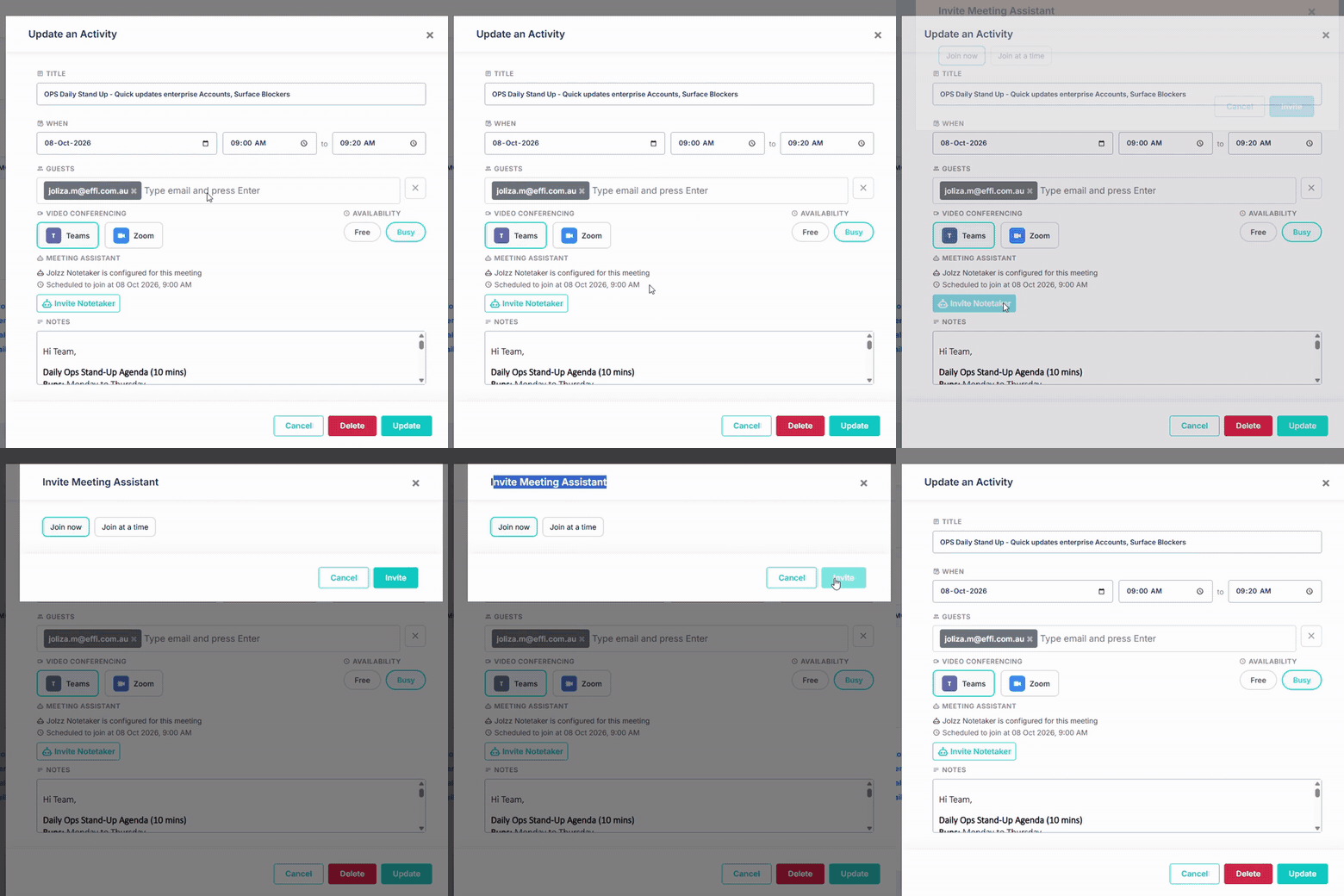
NoteTaker organises the conversation
around your templates into
structured Fact Find and
loan notes, with action items
and a speaker-labelled, time-stamped
transcript.
Upload audio, video or a
transcript, or invite NoteTaker
from your Effi Calendar.
Review the output before
using it.
|
|
| |
|
GET MORE FROM EFFI
From documents to your settled book
|
DOCUMENT AUTOMATION
Spend less time preparing the file.
Automatic masking of sensitive
information such as TFNs,
naming to your convention,
filing to SharePoint and
checks against the Fact Find.
Set naming rules and destinations
by document type, then sync
all files or selected ones.
Review flagged anomalies
before sharing.
Mask→Name→File→Check
Explore document checks →
|
|
SMART REPORTING
Ask about your book in plain English.
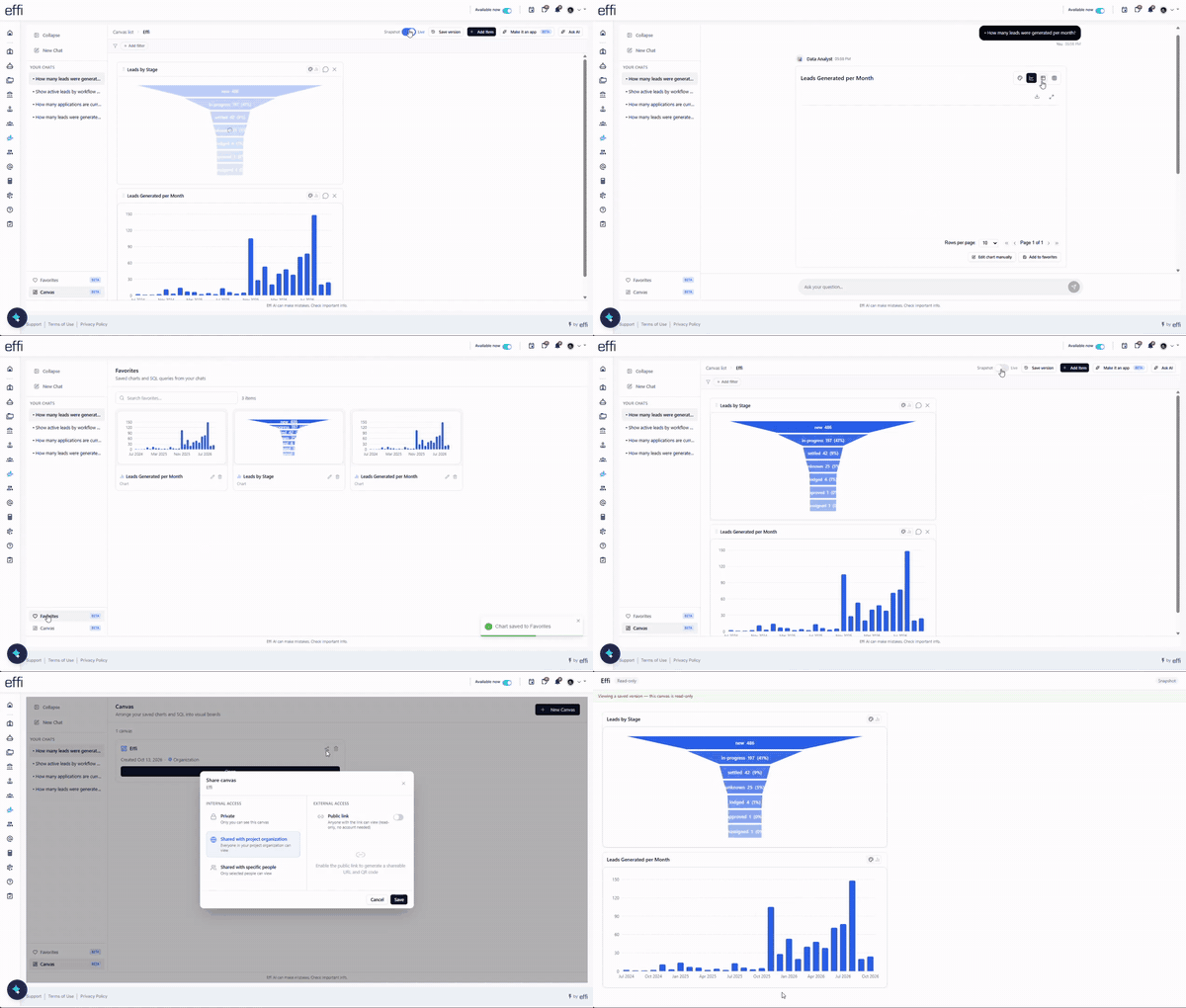
Get charts straight from
your CRM data, save your
favourites to a canvas, then
share it your way. Public
links are read-only and need
no account.
PrivateYour organisationSpecific peoplePublic link + QRLive or snapshot
Explore reporting canvases →
|
|
CLIENT RETENTION · CONNECT360
Keep the conversation going after settlement.
Monitor your settled book
and spot opportunities around
equity, fixed-rate expiry
and annual reviews. Use reminders
and automated follow-ups;
where enabled and with client
consent, open banking can
inform ongoing reviews.
EquityFixed-rate expiryAnnual reviews
Explore Connect360 →
|
|
|
▶
DEMO SPOTLIGHT / JANET VOICE
AI
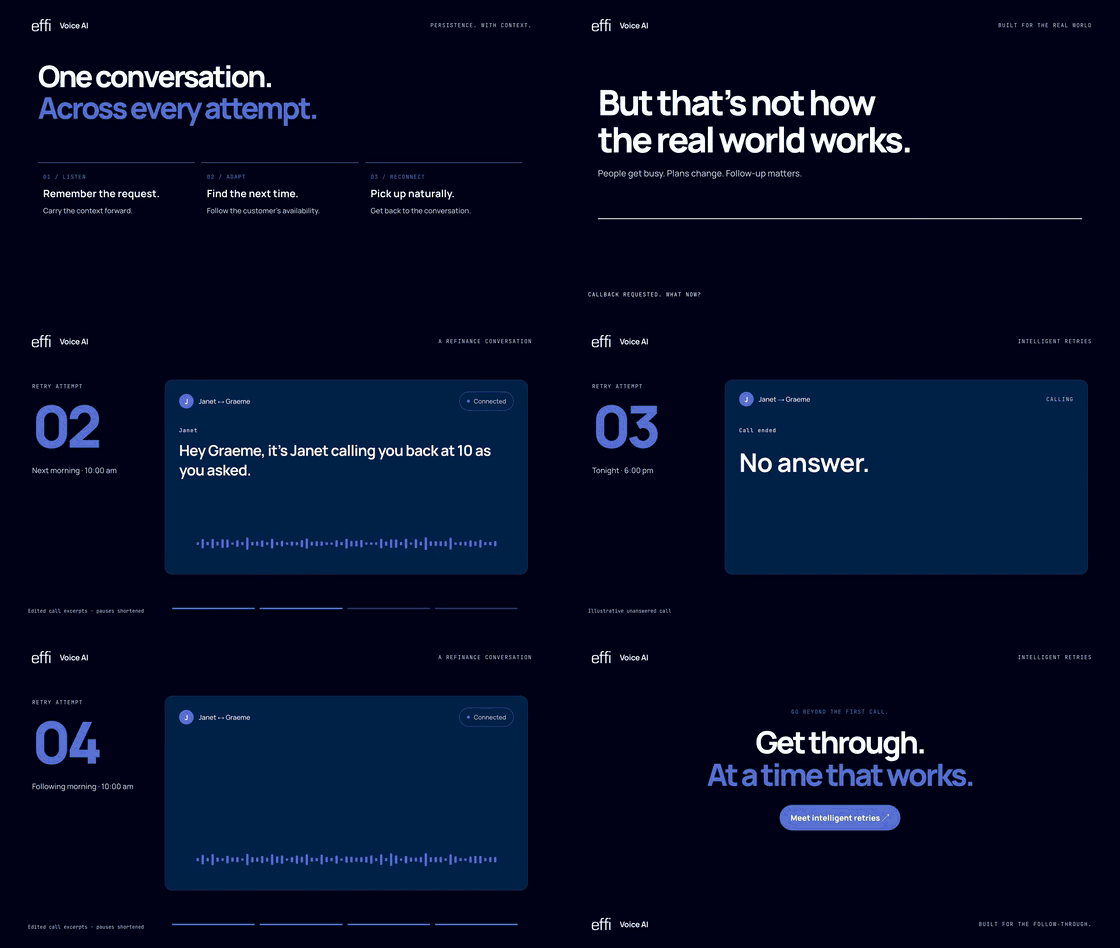
A follow-up that remembers the conversation.
Plans change and clients
get busy. Watch Janet remember
a requested callback time,
follow up by SMS after an
unsuccessful attempt and
pick up the conversation
when the client is available.
|
1
|
Initial call
Client asks for a callback at a better time.
|
|
2
|
Callback attempt
Janet calls back at the requested time; no answer.
|
|
3
|
SMS follow-up
A text keeps the thread alive.
|
|
4
|
Conversation continues
Context carries across every attempt.
|
Ask our team about availability for your business.
|
|
Effi and Connective, in step.
Connect your Connective Nexus
account with the new sign-in
flow, then keep your lead,
client and loan details aligned
across both systems, with
less rekeying and reconciling.
| Lead stages |
Effi ⇄ Connective |
|
| Applicant details |
Effi ⇄ Connective |
|
| Fact Find |
Effi → Connective |
|
| Lodged, approved, settled loans |
Connective → Effi |
|
|
Full Fact Find.
Assets, liabilities,
expenses and
income sync to
Connective.
|
Loans come back.
Loan details
and the aggregator
opportunity ID
return to Effi.
|
|
Clearer errors.
If something
is missing, the
message tells
you exactly what.
|
Faster setup.
Copy mappings
from the lead
broker in your
business.
|
|
|
|
CHANGELOG
More in this release
INTEGRATIONS
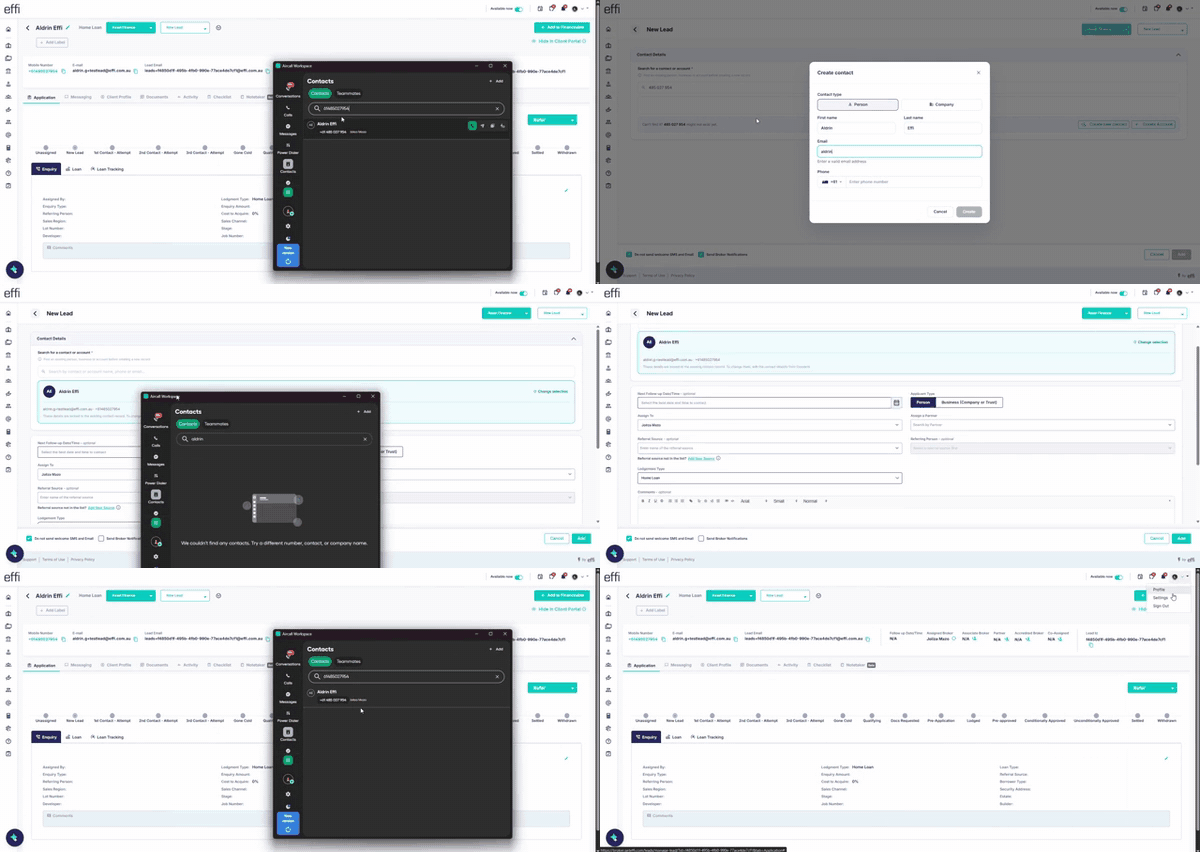
Aircall contacts.
Your
Aircall contacts
now stay updated from Effi automatically.
|
CRM
Accounts & Contacts.
Start leads from
accounts
with applicants pre-filled, manage
linked leads and enable savings
and loan tracking at account
level.
|
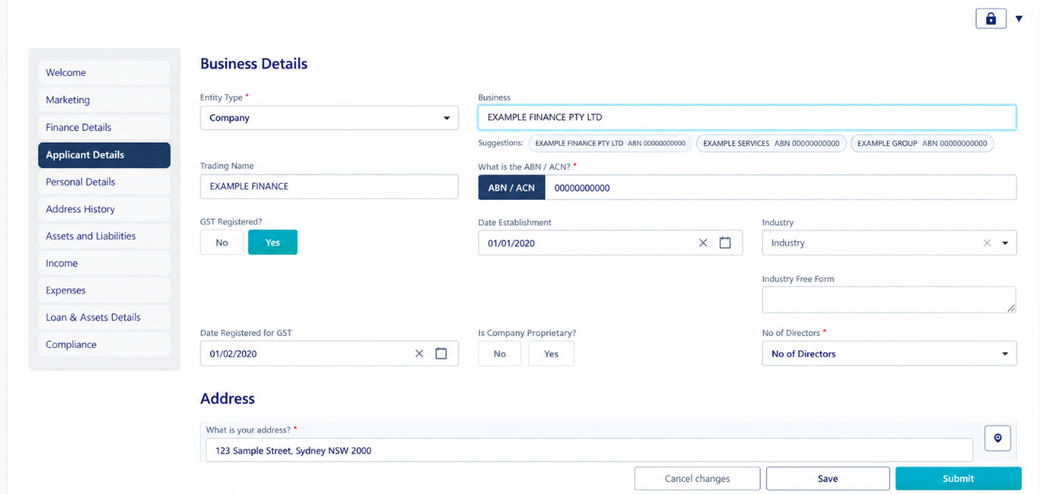
POLISH
Small improvements.
Three-applicant Fact Find summaries
and business/ABN lookup reduce
manual work.
|
|
| USING QUICKLI? |
ACTION NEEDED
|
Make the switch to V3
Replace your existing API
key with your latest Broker
Token. Do this once for
each broker account.
|
01
Log in to
your Quickli
account.
|
02
Go to
Integrations › Your Effi Key.
|
|
03
Copy your
latest broker token.
|
04
In Effi:
Settings › Integrations › Quickli,
enable Use V3,
paste into
Broker Token
and save.
|
|
|
|
ROADMAP PEEK
More help behind the scenes.
|
IN DEVELOPMENT
Credit guide e-signatures
Send each applicant a pre-filled
guide to sign, then save
the signed copy to the lead.
Signing remains the client’s
action.
|
IN DEVELOPMENT
Fact Find & Zoho
Reusable client details and
refreshed forms, plus expanded
Zoho layout, field and workflow
mapping.
|
|
IN DEVELOPMENT
AI & document tools
Deal summaries, document
follow-ups, clearer fraud
checks and sync previews.
|
IN DEVELOPMENT
Mobile, loans & sign-in
Siri and task widgets, clearer
loan fields and start dates,
better error messages and
one-time client login codes.
|
In development or rolling out. Availability
and timing may change.
|
Want to try something new?
Reply to this email or contact
support@effi.com.au for a
walkthrough.
Some features need an admin,
an add-on or setup.
|
|
|
© 2026 Effi. You’re receiving this as an
Effi platform user.
%SENDER-INFO%
Unsubscribe
|

Comments
0 comments
Please sign in to leave a comment.