Agent Centre goes live this Friday, and it's free until 30 November 2026. Plus, see every email before it sends. ͏ ͏ ͏ ͏ ͏ ͏

|
October 2026
|
|
|
|
Meet your new
admin crew.
|
|
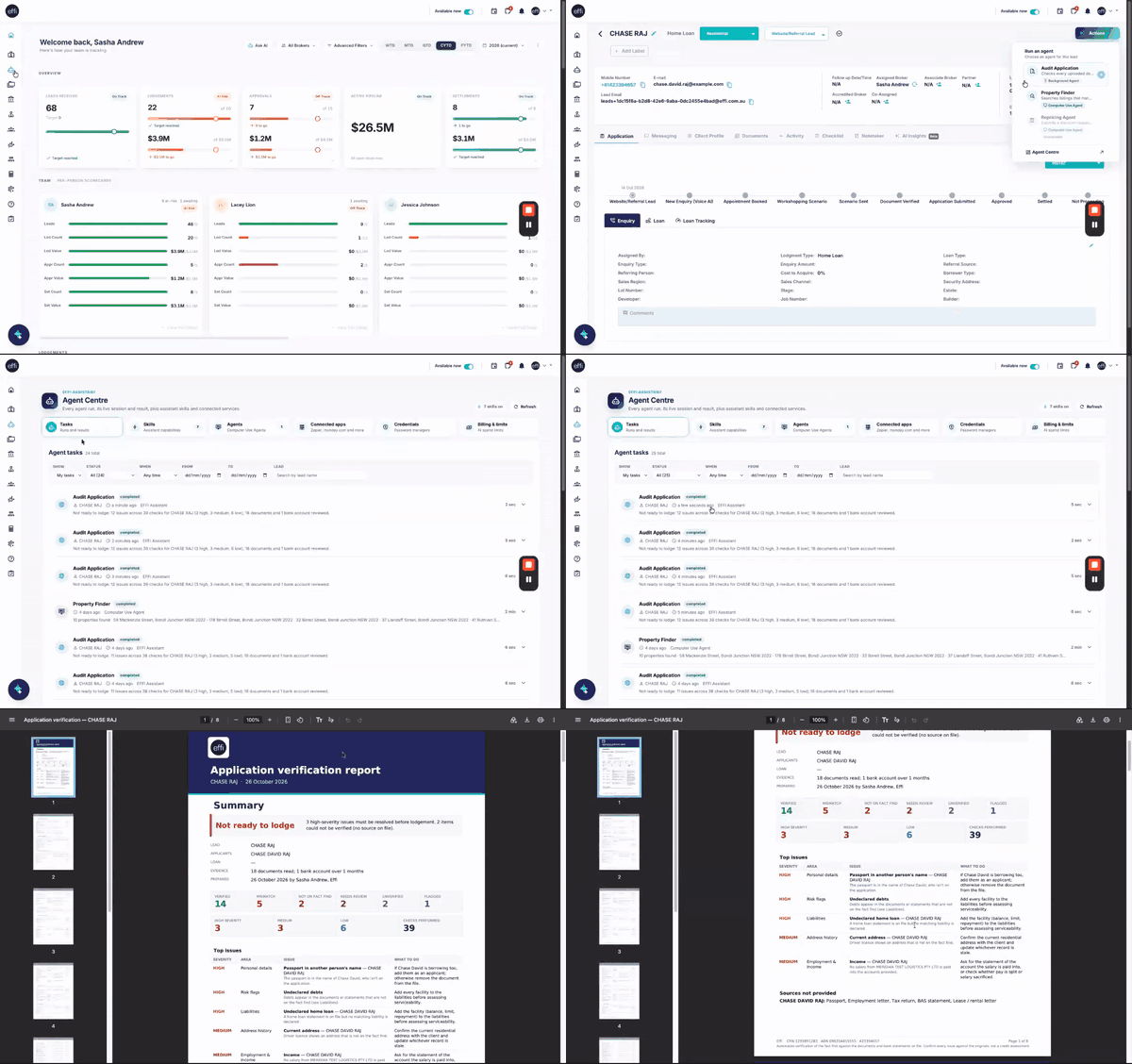
Agent Centre goes live this Friday. It's home to Effi's AI agents: helpers that take on the time-consuming admin in the background, while you get on with your clients.
|
|
On the house
Free until 30 November 2026
Try every agent at no cost for your whole team. You can track usage anytime in Billing & limits.
|
|
|
|
|
01
Agent Centre, Fri 30 Oct
|
|
02
Pop-up templates
|
|
|
|
Hi %FIRSTNAME%,
We've been busy building ways to give you back time in your day. This month brings Agent Centre, your new team of AI helpers, plus a smarter way to check emails before they go out. Here's a quick look at both.
|
| 01 |
Agent Centre · Live Friday 30 October
Start an agent. Keep working.
|
Run an agent from any lead and carry on with your day. The result lands in Agent Centre when it's done, often within seconds.
|
|
▶ Watch the full 3-minute tour
|
|
Available from Friday
|
Audit ApplicationREADY TO USE
Your second pair of eyes before lodgement. It checks documents and bank statements against the fact find and flags anything missing or mismatched, in seconds.
|
| |
|
Property FinderQUICK SETUP
Searches listings that match your client's brief and saves a shortlist for you.
|
Quick setup: Property Finder needs a one-time setup. Link your logins securely through 1Password under Credentials, then select Configure on the agent. Effi never sees your passwords.
|
|
Where to find it
From Friday, tap the robot icon in the left menu, or open a lead and choose Actions › Run an agent.
|
|
|
Admins: turn it on for your team
Each person needs AI switched on before they can use the agents.
1 |
In Agent Centre, open Billing › Card & limits. |
2 |
Under Users, switch AI on for each team member. |
3 |
Select Save changes. |
|
|
|
|
|
| 02 |
Also new · Pop-up templates
See it. Tweak it. Then send it.
|
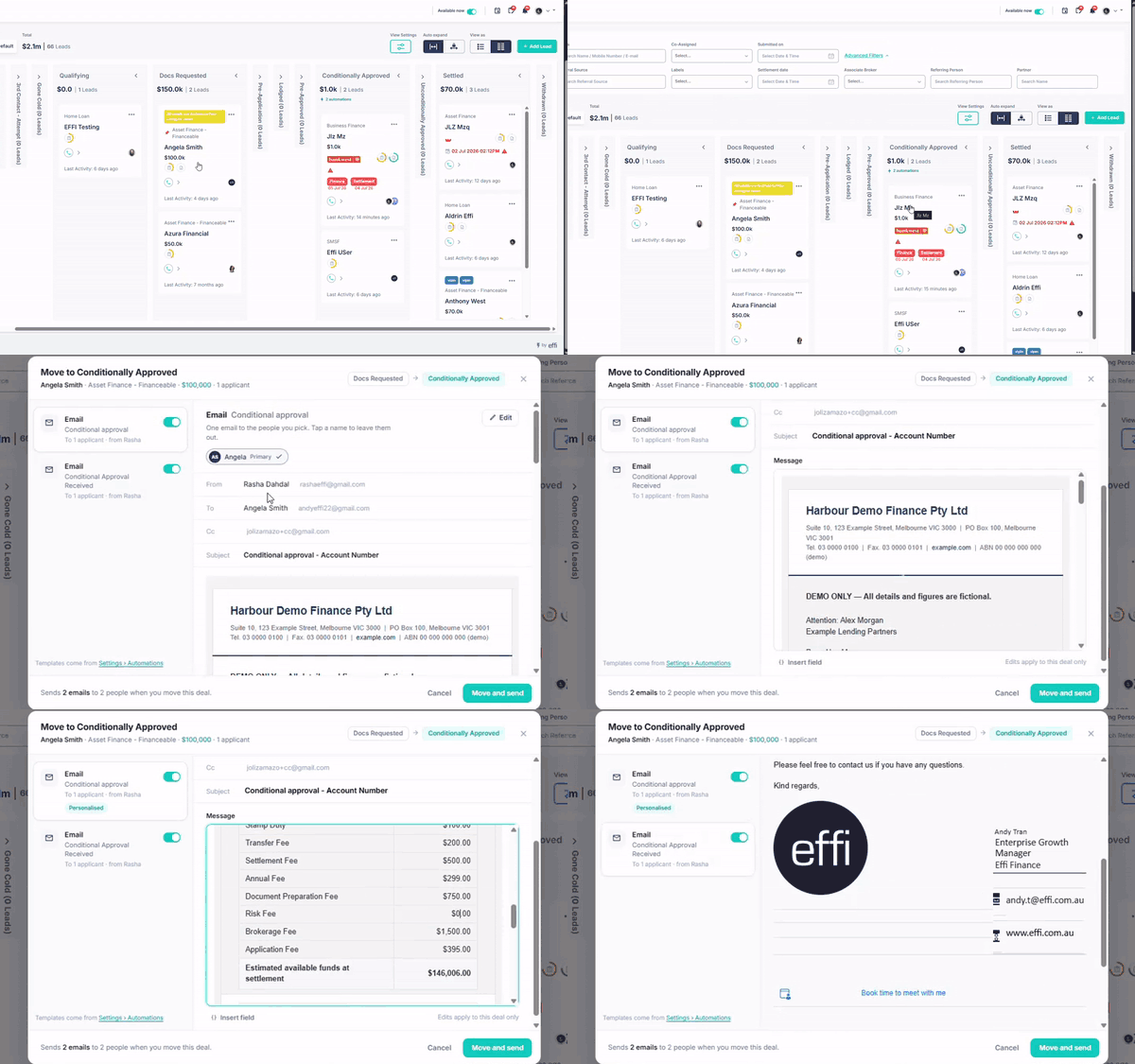
No more surprise emails when you move a lead. A pop-up now shows exactly which emails and SMS will go out, to whom, and what they say, so nothing sends until you're happy.
|
|
▶ Watch the full walkthrough
|
|
Before
Move a lead and hope the right email went out to the right person.
|
|
|
Now
See every message, switch off what you don't need, and make it personal.
|
|
|
|
Here's how it works
1 |
Drag a lead to a stage with auto-send emails or SMS set up. |
2 |
Look over the list. Every email and SMS for that stage, with who it's to and who it's from. |
3 |
Make it yours. Toggle off anything you don't need, or edit the wording for this client. |
✓ |
Hit Move and send. Everything sent or skipped is saved on the lead, so your team's always in the loop. |
|
|
The messages come from your templates in Settings › Templates. Tip: use Send test to check one in your own inbox first.
|
|
As always, if anything's unclear or you'd like us to walk your team through it, just hit reply. A real person from our team will get back to you.
|
e
|
The Effi Support Team
support@effi.com.au
|
P.S. Agent Centre is free until 30 November 2026. Run the Audit Application agent on your next deal before lodgement and see what it finds.
|
Need a hand? support@effi.com.au · Mon–Fri, 9am–5pm AEST
Help Centre · effi.com.au
|
|

Comments
0 comments
Please sign in to leave a comment.